Share
A WiFi strip light can make the gap between a plain room and a proper setup feel surprisingly small. In this WiFi strip light review, we’re looking at what these smart LEDs really bring to a bedroom, gaming desk, TV wall or home office - and where expectations need to stay realistic.
The headline is simple: WiFi strip lights are worth it when you want your lighting to do more than sit on one colour. App controls, schedules, scene modes and voice-assistant compatibility give you more ways to shape the mood without getting up from your chair. For gamers, streamers and anyone tired of a flat-looking room, that is a serious upgrade for a relatively low-effort install.
What makes a WiFi strip light different?
A standard LED strip gives you light. A WiFi strip light gives you control over the light from your phone, and usually through a compatible smart speaker too. Instead of reaching behind the desk to press a tiny controller, you can switch your setup from calm warm white to a vivid purple-and-blue scene in seconds.
That changes how useful the strip feels day to day. Set a low amber glow for winding down, choose crisp white light for working, then fire up a moving colour effect when it is game time. The best part is not having hundreds of colours available. It is being able to match the room to what you are doing without making a fuss about it.
WiFi also means remote control can work beyond Bluetooth range, provided the strip and your phone have an internet connection. That is handy if you have left home and cannot remember whether you turned the lights off. It is less essential for someone who only wants LEDs behind a monitor and plans to use one favourite setting forever.
WiFi strip light review: the features that matter
A flashy product page can make every strip look identical. They are not. The details below have the biggest effect on whether the finished setup looks premium or slightly chaotic.
App control should be quick, not clever for the sake of it
A good lighting app makes the basics effortless: power, brightness, colour, white temperature, timer and scenes. If it takes several screens to lower the brightness before bed, the smart features will stop feeling smart very quickly.
Scene presets are especially useful for people who like changing the energy of a room. Look for options that let you save your own combinations, rather than forcing you to scroll through a huge library of novelty effects. A deep red scene for a horror game, soft pink for getting ready, and an icy blue desk mode are more valuable when they are one tap away.
Music-reactive modes can be great fun for parties, playlists and gaming clips. They can also look distracting if the colours jump too aggressively. Treat them as an extra, not the main reason to buy. A smooth static scene often looks better on camera and feels more comfortable during a long session.
Colour quality matters more than the colour count
Nearly every RGB strip promises millions of colours. In practice, brightness, saturation and diffusion matter far more. A strip that produces rich blues, clean greens and convincing warm whites will make your space look more polished than one that simply has a long list of modes.
If you want lighting for a desk, TV backlight or shelving, choose a strip that can dim low without flickering. Brightness is great for a party or a bold RGB battlestation, but low-level light is what you will use when watching a film, chatting late at night or playing without screen glare.
Bear in mind that RGB strips can create white light by mixing colours, but dedicated white LEDs generally look more natural for everyday use. If the strip will be your main practical light source for reading or working, check whether it offers a proper white-light option. For pure ambience, standard RGB is usually enough.
Length and cut points decide whether it looks tidy
Measure before you order. This sounds obvious, yet it is the difference between a clean perimeter glow and a spare coil of LEDs stuffed behind a cabinet. Measure the route along the surface, including corners, rather than the straight-line width of the furniture.
Most strip lights have marked cut points, allowing you to trim excess length. Only cut where the marks indicate. Cutting elsewhere can leave the remaining section unusable, and reconnecting pieces often needs extra connectors or a bit of patience.
For a monitor or TV, positioning the strip a few centimetres in from the outer edge usually gives the most even wall glow. For desks, run it underneath the rear edge or around the underside of the tabletop so the individual diodes are hidden. The light should feel like it is coming from the furniture, not like a bright tape measure has been stuck to it.
Setup is easy, but preparation makes it better
Most WiFi strip lights are beginner-friendly. Clean the mounting surface, test the strip before removing the adhesive backing, stick it down carefully, connect the controller, then pair it through the app. Still, five extra minutes of preparation can save you from peeling and resticking a strip later.
Wipe dust and grease from the surface first, especially beneath desks where hands, cables and cleaning sprays have been. Let it dry completely. Adhesive will struggle on rough, damp or heavily textured walls, so consider LED mounting clips for long runs or surfaces that get warm.
Plan the position of the controller and power cable before sticking anything down. A strip may reach around the desk perfectly, only for the controller to end up on the visible front edge with no sensible route to the plug. Start near the power source where possible, then work around the layout.
When pairing to WiFi, many smart lights use a 2.4 GHz network rather than 5 GHz. This is normal, but it can catch people out if their router combines networks or the app will not find the strip. Keep your phone near the controller during setup and follow the app prompts slowly. Once connected, the experience should be much more straightforward.
The trade-offs worth knowing before you buy
WiFi control has a few compromises. It relies on your router, so a weak signal in a garden office, loft room or far corner of a large home can make app response less reliable. Bluetooth-only strips can be simpler in a single room, though they do not offer the same remote access and smart-home flexibility.
There is also the issue of cable management. Strip lights themselves are thin, but the power adapter and controller still need somewhere to live. A clean setup needs cable clips, a hidden extension lead or a little thought about furniture placement. The LEDs deliver the visual magic; the wiring is the unglamorous bit that makes or breaks the final look.
Finally, smart strip lights are accent lighting, not a replacement for every ceiling light. They look their best when paired with existing lamps, monitor lighting or wall décor. Use them to add depth and personality, rather than expecting one strip to illuminate an entire room evenly.
Who will get the most from WiFi strip lights?
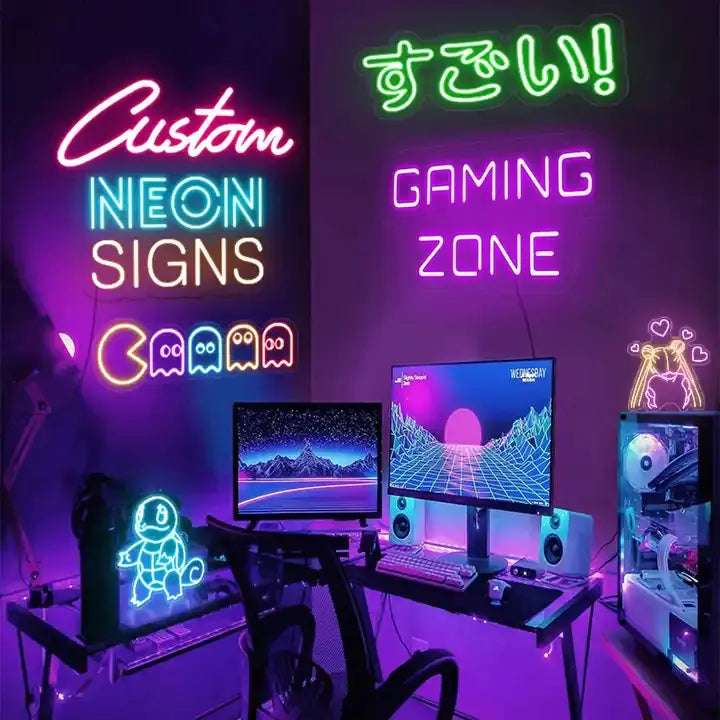
They make the strongest impact in spaces where atmosphere already matters. A gamer can use matching colours to frame a monitor, desk and PC area. A student can make a small bedroom feel less temporary without filling it with bulky décor. A home worker can separate work mode from evening mode with a change of light instead of a complete room rearrangement.
They are also a smart choice for renters because they deliver visible change without painting walls or installing permanent fittings. Just test adhesive carefully on delicate paint and avoid sticking directly over peeling finishes.
For an affordable way to make a room feel more like your own, WiFi strip lights are hard to beat. RGB Illuminations-style setups work best when you choose a colour story rather than switching every effect on at once: pick two or three shades you genuinely like, hide the hardware, and let the glow do the talking.